

How to Spot Original Graphic Designs: A 2026 Guide
Table of Contents
- Why Original Graphic Designs Matter for Your Wardrobe
- Identifying AI-Generated Images in Graphic Design
- How to Spot Stolen Artwork on T-Shirts
- Frequently Asked Questions
Last Updated: September 19, 2026
Why Original Graphic Designs Matter for Your Wardrobe
Spotting original graphic designs comes down to three checks: a reverse image search, a close look at the artwork, and a quick read of the label. We sell funny party tees, so we have a stake in this.
Identifying AI-Generated Images in Graphic Design
AI-generated art has flooded the graphic tee market because it costs nothing to produce and looks convincing at thumbnail size, but the flaws show when printed 12 inches wide. Spotting AI output takes two passes: a visual pass on the artwork and a technical pass on the file.
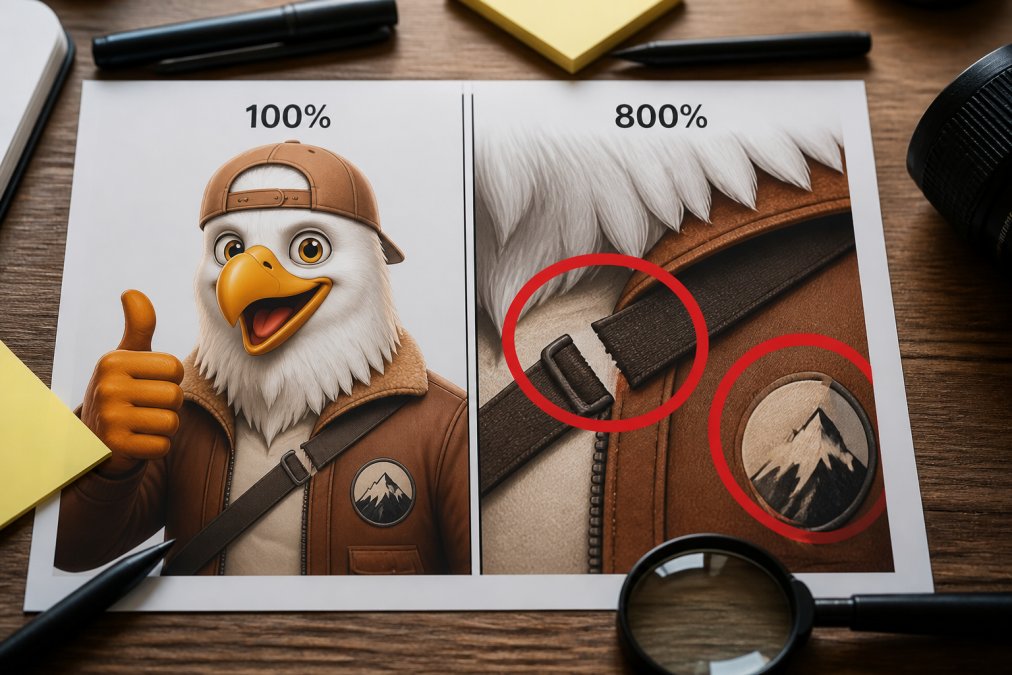
The visual pass: what AI still gets wrong
Look at parts requiring structural understanding, not just texture. Hands, teeth, ears, and lettering are classic failure points, but the tells have gotten subtler. Check for:
- Lettering that is almost a word. Doubled strokes, missing crossbars, or a letter that morphs mid-word.
- Hair and fur that merges into fabric. Strands that dissolve into a collar instead of overlapping it.
- Jewelry, straps, and laces that don't connect. A necklace passing through a neck, or a shoelace with no knot.
- Symmetry that breaks. Reflections and repeating patterns drift out of alignment.
- Shading with no light source. Highlights on both sides of a face, or shadows pointing two directions.
- Background texture that repeats. Zoom to 400% and look for the same swirl tiled across a large area.
The technical pass: inspect the file, not the picture
This is the step most buyers skip, and it produces hard evidence.
- Check resolution against print size. A full-front print needs roughly 300 pixels per inch, about 3,600 pixels across for a 12-inch print. AI generators often output at fixed sizes like 1024x1024, useless for a shirt.
- Read the metadata. AI tools frequently strip EXIF data, so a file with no camera, no software, and no creation history is worth a second look.
- Look for vector paths. A genuine logo or mascot is usually vector art with clean anchor points. A single flattened raster layer was traced badly or generated.
- Zoom to 800% and check the edges. Vector edges stay crisp; raster edges show stair-stepping; AI edges often show a soft halo or faint grid pattern.
- Run the image through a detection tool. Treat any single result as one data point. Run two or three detectors and look for agreement; false positives are common on stylized illustration.
Why this matters for print quality
AI artifacts are a production problem, not just an originality one. Warped lettering prints as warped lettering, and melting details print as mud. If the seller cannot produce a high-resolution file or a vector source, the design was never built to be printed, which usually means it was never built by a designer at all.
How to Spot Stolen Artwork on T-Shirts
Reverse image search is the first move, but the harder question, the one that actually protects you, is whether the seller has the right to sell the design. That is a legal question, not just a visual one.
Step 1: Run the reverse image search properly
Save the design at the highest resolution you can get, then run it through more than one engine, Google Images, TinEye, and Bing Visual Search index different corners of the web. Crop to the central motif as well as the full design, since thieves often add a border to defeat a full-image match.
What you're looking for:
- The same artwork on a portfolio site, art marketplace, or social feed with a different seller's name attached.
- The same artwork in a different colorway, a common way to disguise a lift.
- Stock photography or clip-art libraries hosting the same motif, meaning the "designer" licensed a template.
Step 2: Verify ownership, not just existence
Finding the artwork somewhere else does not automatically mean it was stolen. It could be licensed. The question is whether the seller can prove a chain of rights. Ask directly, in writing:
- "Who created this artwork, and on what date?"
- "Can you provide the layered source file?"
- "Is any element of this design licensed from a third party, and if so, under what terms?"
Step 3: Know what the law actually protects
The U.S. Copyright Office guide to visual arts is the starting point for understanding what counts as protected work. Two practical points matter for buyers:
- Copyright attaches at creation, not registration. A design is protected the moment it is fixed in a tangible form; registration only strengthens the owner's ability to sue and collect statutory damages.
- Ideas are not protected; expression is. A shirt with the same phrase as another is not infringing, but copying the specific illustration, layout, and typography may be.
Step 4: Put an originality clause in the contract
If you are commissioning a design, the strongest protection is contractual. Ask for language that does three things:
- Warrants originality. The designer represents the work is original and does not infringe any third party's rights.
- Requires indemnification. If a third party sues, the designer covers your defense and damages.
- Transfers rights explicitly. A work-for-hire clause or copyright assignment makes you the owner; without it, the designer may retain the copyright even after you pay.
Step 5: Read the file format as evidence
File format is a quiet tell. Vector files, .AI, .EPS, .SVG, stay sharp at any size and are standard for logos and mascots. Raster files, .JPG, .PNG, degrade when enlarged. A seller offering only a low-resolution raster file either worked from a stolen source or never had a real one; a genuine designer keeps the vector original and can hand it over.
Frequently Asked Questions
How can you tell if a graphic design is stolen?
Run a reverse image search on Google or TinEye to see if the design appears on other sites or stock image libraries. Check for pixelation or low-resolution edges, which often indicate a copied file. Look for mismatched fonts or inconsistent line weights that suggest tracing. If the design lacks a visible artist credit or appears on multiple unrelated shirts, it is likely stolen.
What are the signs of AI-generated graphic design?
AI-generated designs often have telltale artifacts: extra fingers, merged letters, impossible geometry, or smudged details. Text may be garbled or nonsensical. Shadows and lighting may not match across the image. Skin textures can look plastic or overly smooth. Zoom in closely; if small details dissolve into noise, it is probably AI. Tools like AI or Not and Illuminarty can help confirm suspicions.
How do I check if an image is copyrighted?
Search the U.S. Copyright Office database for registered works. Look for a copyright notice or watermark on the original source. Check the designer's website or portfolio for usage terms. If the design appears on a stock site like Shutterstock or Adobe Stock, it is licensed, not original. When in doubt, contact the artist directly and ask for proof of ownership.
Cheap copies are everywhere, and spotting them takes five minutes. StumbleRump builds every design in-house, so you get bold, funny graphics that are actually ours. Our tees come in cuts for both men and women, with themes like Camel Towing and other party-ready slogans. Get started with StumbleRump and wear a shirt you don't have to second-guess.